 HappyHorse Model
Batch AI Video Generation: Automate Your Workflow
If you’re still making AI videos one at a time, you’re leaving a huge amount of speed on the table. A solid batch ai video generation automation setup can take one prompt, one spreadsheet, or one product feed and turn it into dozens of ready-to-publish videos without rebuilding the process every single time. That shift matters because the bottleneck usually is not ideas anymore. It’s formatting, exporting, naming, checking, and posting over and over. Once you systemize those steps, volume becomes much easier to manage.
What batch AI video generation automation actually means

How batch generation differs from manual video creation
Manual video creation usually means opening a tool, writing a script, finding visuals, editing scenes, adding captions, exporting, then repeating the same work for the next video. Batch automation changes that completely. Instead of building every asset from scratch, you define a structure once and feed it multiple inputs. Those inputs can be topic ideas, product URLs, scripts, rows in a spreadsheet, or clips from a long video.
That is the core idea behind batch video creation automation described in research such as “Batch Video Creation Automation: Scale 1000 Videos Daily.” The emphasis is on using AI plus cloud-based template engines to generate multiple videos from structured inputs rather than producing each video manually. In practical terms, you stop thinking like an editor working on one file and start thinking like an operator running a production line.
A lot of current tutorials frame this as “one prompt” or “one click” bulk creation. That language shows up repeatedly in examples like “How I Created Unlimited AI Videos in Bulk (One Click)” and “How to Generate Bulk AI Videos Automatically with One Prompt.” The appeal is obvious: less hand-editing, more repeatable output, and far fewer moments where you are stuck making small formatting decisions.
The basic input-to-output model behind bulk AI video workflows
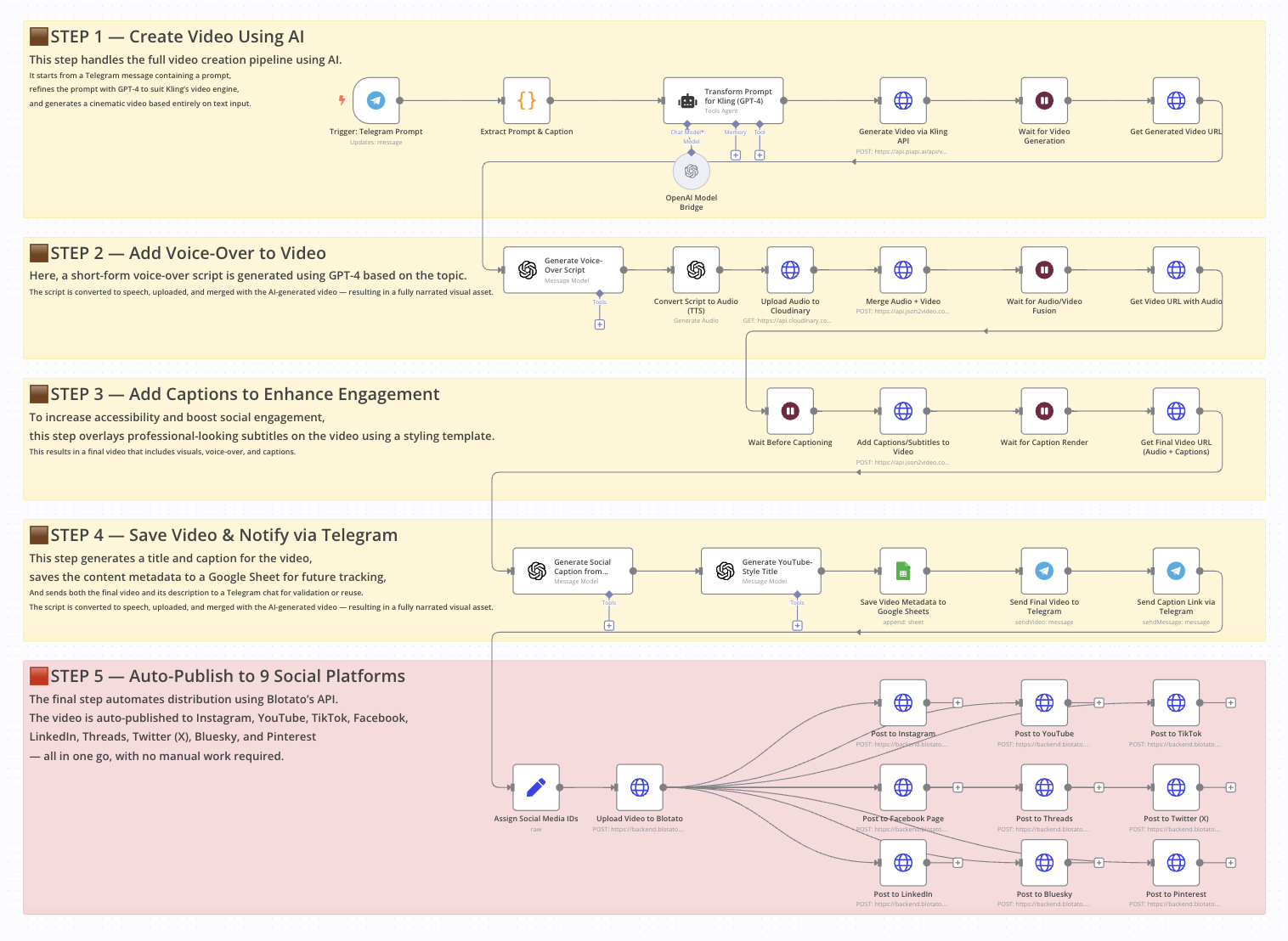
The simplest way to think about batch ai video generation automation is as an input-to-output pipeline. You start with a prompt or data source, use AI to generate titles and scripts, pass those into a video tool, export the finished files, and then push them into a publishing workflow.
A reliable model looks like this:
- prompt or data source -> script and ideas -> video generator -> export -> publishing pipeline
That pattern shows up directly in the Reddit workflow “I built a fully automated AI video factory. Here's the Make + AI workflow.” In that setup, the process starts with ChatGPT, uses Google Sheets as part of the workflow, then connects generation and posting into a hands-free system for YouTube, Instagram, and TikTok.
Batch generation works best when your videos follow a repeatable pattern. Social clips are an easy fit because they share a similar structure: hook, payoff, captions, branding, CTA. Faceless content also works well because voiceovers, stock visuals, AI visuals, and kinetic text can all be templated. Repurposed long-form content is another strong use case, especially when one podcast or interview can produce many short clips. Product videos are ideal too, because each SKU follows the same framework with different names, benefits, prices, and links.
If the content can be standardized, it can usually be batched. That’s the real threshold to watch.
Build a batch ai video generation automation workflow step by step

Set up your ideation engine with ChatGPT or similar tools
The easiest way to build your workflow is to start where the ideas originate. In the Reddit AI video factory example, the process begins in ChatGPT, where a custom prompt generates batches of video ideas, titles, and related content. That is exactly how to structure your own system. Do not prompt for one script at a time. Prompt for sets.
A reusable prompt should ask for output in a consistent format. For example, generate 20 rows with these fields: title, first-line hook, 30-second script, on-screen caption summary, scene instructions, CTA, target platform, and visual style. If your output always follows the same field order, it becomes much easier to send into Sheets or an automation tool.
The key is specificity. Ask for title lengths, hook formats, scene count, caption style, and CTA tone. If you want short-form video, tell the model to write in beat-based chunks such as Scene 1 Hook, Scene 2 Context, Scene 3 Proof, Scene 4 CTA. If you want product promos, request benefit-led scripts with one feature per scene.
Use Google Sheets or structured data as your video source
Once the AI has generated the content, move it into a spreadsheet. Google Sheets works especially well because it is simple, flexible, and easy to connect with no-code tools. In the research-backed workflow, Sheets acts as part of the operational center, and that is exactly how it should function.
Set up columns like these:
- Video ID
- Title
- Hook
- Script
- CTA
- Visual style
- Voice type
- Aspect ratio
- Platform
- Source asset or URL
- Publish status
- Export link
- Notes
This gives you one place to review, edit, approve, and track everything. If one row equals one video, your automation becomes very easy to reason about. You can sort by platform, filter by status, and rerun only the failed rows instead of redoing an entire batch.
The recurring pattern from the research is clear: ideation engine to spreadsheet or data source to video tool to distribution. For orchestration, use a no-code layer like Make or n8n. The Reddit “AI video factory” specifically highlights a Make + AI workflow, while a separate tutorial on automated product videography demonstrates the same kind of logic in n8n. Both are good fits if you want one repeatable pipeline.
A simple build looks like this: ChatGPT creates structured output -> Make parses it into Google Sheets -> approved rows trigger a video generator -> exports are written back into Sheets -> final approved videos get scheduled for posting. Once you have that loop running, the workflow stops feeling experimental and starts feeling operational.
Best tools for batch ai video generation automation
One-click and one-prompt bulk video tools
Different tools solve different parts of the workflow, so it helps to group them by use case. For one-click and one-prompt creation, the research points to Auto Whisk, Grok Automation, InVideo, and Make-based automation workflows.
Auto Whisk appears in the tutorial “How I Created Unlimited AI Videos in Bulk (One Click) | FREE Text-to-Video Automation (2026)” and is positioned around fast, bulk text-to-video output. That makes it attractive when your main goal is volume and you want a lightweight system that converts prompt-driven scripts into many videos quickly.
Grok Automation is highlighted in “How to Generate Bulk AI Videos Automatically with One Prompt.” The appeal here is the prompt-centric workflow. If you already have a strong scripting process and want to push one master prompt into many outputs, this category is useful.
InVideo is more flexible across multiple formats. The research specifically notes InVideo + VEO 3.1 for long AI videos, with one source mentioning creation of up to 10 long AI videos in a single prompt-driven workflow. That partial figure is still useful because it shows the orientation: InVideo is not just for quick clips; it can support longer, more structured outputs too.
Make-based workflows are less about generation quality and more about orchestration. They shine when you want to connect ideation, spreadsheet logic, video creation, and social publishing in one pipeline.
When to use hosted tools vs open source AI video generation models
Hosted tools are usually the fastest route to execution. You get templates, rendering infrastructure, easy exports, and fewer setup headaches. If you are producing short-form clips, social posting pipelines, or product videos at speed, hosted tools often win on convenience.
Open source options are better when you want control, customization, or local deployment. If you are researching an open source ai video generation model, an image to video open source model, or how to run ai video model locally, you are probably optimizing for flexibility rather than simplicity. You may also be evaluating a niche model such as happyhorse 1.0 ai video generation model open source transformer or another open source transformer video model to experiment with custom visual styles or infrastructure ownership.
The tradeoff is straightforward:
- Speed: hosted tools usually win
- Cost at low volume: hosted tools are easier to justify
- Cost at large scale: local or open source can become attractive
- Ease of setup: hosted tools by a mile
- Customization: open source wins
- Commercial clarity: depends on the tool and model license
Commercial use is where people get caught. If you use an open model, check the exact terms around open source ai model license commercial use before you build a client-facing or ad-heavy workflow on top of it. Some models are open for research but restrictive for business use. Others allow commercial deployment with attribution or other limits. Always verify that before you automate at scale.
For most operators, the decision framework is simple: start hosted, prove the content format, and only move toward open source when you actually need deeper control or lower render costs at volume.
How to automate bulk short-form videos and clip generation

Create multiple Shorts, Reels, and TikToks from one source
Short-form content is where automation pays off fastest because one long asset can produce many outputs. A podcast, interview, webinar, tutorial, or talking-head recording can become a full batch of Shorts, Reels, and TikToks if you build the extraction step correctly.
The research includes a tutorial showing how to turn one long video into multiple short clips automatically using a phone by recording or uploading a podcast, interview, or talking video. That matters because the source footage does not need to be elaborate. If the audio is clear and the content has enough useful moments, the clip engine can do a lot of the heavy lifting.
Another tutorial claims it can make 20 AI short clips in bulk with “100% FREE,” “No credits,” “No subscriptions,” and “No watermark.” Whether you use that exact stack or not, the important takeaway is the workflow logic: one input source can drive many outputs without rebuilding each edit manually.
Add intros, outros, and clip ranges in bulk
For more control, use a bulk clip generator approach. The Reddit source “Create Multiple Video Clips with Intro & Outro in Bulk (Free)” describes a Bulk Clip Generator that can extract multiple clips in one go by setting various time ranges and can also add intro and outro videos in bulk. That is incredibly useful if you already know the best moments in a long video.
A clean setup looks like this:
- Column A: source video file
- Column B: clip start time
- Column C: clip end time
- Column D: hook text
- Column E: intro template
- Column F: outro template
- Column G: subtitle preset
- Column H: CTA overlay
- Column I: target platform
With that structure, you can standardize everything around the clip. Use one branded intro, one outro animation, one subtitle style, and one CTA family. Then change only the clip range, hook, and platform formatting from row to row.
For publishing, export in vertical 9:16 for YouTube Shorts, Instagram Reels, and TikTok unless you have a specific reason to change. Keep hooks in the first one to two seconds. Burn captions into the video when possible, because many viewers watch on mute. Use slightly different titles or captions per platform instead of posting identical metadata everywhere. And if you are exporting a large batch, name the files clearly with platform, topic, and version so your scheduling step stays clean.
Short-form works best when the template is fixed and the moments are variable. Once that clicks, bulk clipping becomes one of the easiest wins in your whole system.
Use batch ai video generation automation for product and e-commerce videos

Generate product videos from URLs, images, or scripts
Product video automation is one of the most practical use cases because product data is already structured. You usually have a product name, image set, URL, price, core benefits, and a CTA. That is exactly the kind of input AI video systems handle well.
The research points to tools that generate product ads from a URL or by uploading an image. In the Reddit thread “AI video generator for amazon product listings?”, one recommendation is Tagshop AI, with the note that if you already have a script, you can upload that too. That means you have at least three viable starting points: product link, image asset, or script.
InVideo AI’s product video generator is another strong example. According to the research, users can choose an AI actor or AI twins, add a product through a link or manually, and enter brand details. That combination is powerful for storefront promos, ad creatives, and listing enhancement because it reduces the amount of asset prep you need before generation begins.
Create repeatable templates for catalogs and listings
For a multi-SKU setup, use a spreadsheet as the source of truth. Give each product one row and create columns like these:
- SKU
- Product name
- Product URL
- Image folder
- Main benefit
- Secondary benefit
- Price
- Offer
- CTA
- Aspect ratio
- Platform
- Voice or actor
- Brand colors
- Publish status
That makes it easy to generate batches across an entire catalog. One template can be reused for many product types with only a few fields changing.
Template ideas that work well:
- Amazon listing video: problem, feature, demonstration, social proof, CTA
- Storefront ad: visual hook, top 3 benefits, offer, brand close
- Social product promo: thumb-stopping opener, quick benefit stack, urgency CTA
- Catalog campaign: same structure across every SKU for consistency and speed
The research also references a workflow for automated product videography with AI built in n8n, where the creator explains the logic behind each step and how to customize it for products. That is a strong sign that product video automation should be treated as a system, not a one-off experiment. Pull product data in, generate script variants, create videos from links or images, then publish and track results by SKU.
This is also where batch ai video generation automation becomes especially valuable for ad testing. Instead of making one polished promo for one item, you can create three hooks for 50 products and quickly learn which angles perform best.
Optimize, publish, and scale your batch ai video generation automation system

Quality control before exporting hundreds of videos
The fastest way to waste time is to automate bad output. Before you export a large batch, run a lightweight QA pass that catches the errors most likely to break performance or brand trust.
Use a checklist like this:
- Script matches the topic or product exactly
- Facts, pricing, and claims are accurate
- Brand voice is consistent
- Captions are spelled correctly and timed properly
- Aspect ratio matches the target platform
- Voice setting matches the brand and region
- Visuals align with the script
- CTA is present and clear
- Thumbnail and title match the actual content
- File name and metadata are organized
If your workflow is spreadsheet-based, add QA columns for Script Approved, Visual Approved, Export Approved, and Scheduled. That way you can separate generation from approval and avoid posting anything automatically until it has passed review.
Automate scheduling and distribution across channels
The Reddit AI video factory example is useful here because the goal is a hands-free pipeline that can generate and post content to YouTube, Instagram, and TikTok without manual intervention. That is the right direction, but it only works reliably when status tracking is visible.
A simple scheduling dashboard in Google Sheets can handle a lot. Add columns for platform, planned publish date, actual publish date, post URL, and performance notes. Then use Make or another automation layer to watch for rows marked Ready to Publish and push them to your scheduler or platform connector.
For scaling, a few tactics work especially well:
- Test multiple hooks for the same topic instead of creating unrelated videos every time
- Clone the templates that already perform well
- Separate idea generation from approval so bad drafts never trigger rendering
- Batch exports during off-hours if your tool supports queues
- Keep your assets organized by campaign, platform, and aspect ratio
- Version your prompts and templates so you know what changed when performance shifts
This is also where you should decide when to keep hosted tools and when to experiment with local models. If render costs become a constraint and your workflow is stable, then it may make sense to explore an open source ai video generation model, an image to video open source model, or a workflow where you run ai video model locally. But do that after your content system is proven, not before.
The strongest systems stay simple: one repeatable prompt, one clean sheet, one approval path, one export structure, one publishing workflow. Once the first batch runs smoothly, scaling becomes mostly an operations problem instead of a creative bottleneck.
Conclusion
The biggest upgrade is not a fancy model or a more complex stack. It is moving from one-off video creation to a repeatable system. Start with one prompt that reliably generates titles, hooks, scripts, and scene instructions. Put those outputs into one spreadsheet that tracks status, platform, and assets. Then connect that sheet to one video generator and one publishing workflow.
That is the foundation of batch ai video generation automation that actually works in the real world. From there, you can expand into short-form clip factories, product video catalogs, or fully automated social pipelines for YouTube, Instagram, and TikTok. Keep the first version small, make sure the rows, templates, and approvals are clean, and only then increase volume. Once that first batch runs without friction, scaling gets a lot easier.