 HappyHorse Model
AI Video Generation Cost Analysis: Self-Host vs API
AI video pricing looks simple until retries, credits, GPU costs, and workflow overhead turn a cheap-looking plan into a much larger monthly bill. A tool can advertise $10 per month or a neat per-second rate, but that sticker price rarely matches what you actually spend to get usable clips. The moment you factor in failed generations, multiple prompt passes, upscaling, exports, editing, and the time it takes to keep everything running, the math changes fast.
That is why ai video generation cost self host vs api is not really a question about one listed price versus another. It is a question about usable output. If one workflow gets you 20 polished minutes per month with minimal friction and another burns hours of GPU time plus admin work for the same result, the cheaper option is the one with the lower total cost per finished minute, not the one with the prettiest pricing page.
AI video generation cost self host vs api: the fastest way to compare total spend
What counts as cost beyond the listed price
The listed price is only the starting point. With API tools, the obvious charge might be per second, per clip, or per monthly credit allotment, but the hidden bill usually includes retries, premium models, upscaling, extra exports, and companion tools for editing or cleanup. Lemonlight put real numbers on this broader pattern: a DIY AI video stack may look like $20–$300 per month, yet the “true ecosystem cost” can land around $170–$685 per month before you even have a polished final video.
Self-hosting has the same trap, just with different line items. A free download does not mean free production. If you run an open source model yourself, the cost bucket includes GPU hardware or cloud GPU rental, local storage or object storage, bandwidth, setup time, prompt pipeline maintenance, model updates, monitoring, and recovery when a run crashes halfway through a batch. If you are trying to run ai video model locally, the hardware itself can become the budget sink before you generate a single deliverable.
Why per-second, per-credit, and per-project pricing lead to different answers
Most pricing falls into three buckets: per-second generation, monthly subscription with credits, and self-hosted infrastructure cost. Per-second pricing is the easiest to understand in theory, but it can still mislead because you pay for every attempt, not just the successful one. Credit systems are even harder to compare because one platform’s 700 credits might generate very different lengths, resolutions, or model tiers than another’s. A pricing roundup showed examples like a free plan with 80 monthly video credits, a Standard plan at $10/month with 700 monthly video credits, and a Pro plan at $35/month. Useful numbers, but they do not tell you much unless you know how many final usable seconds those credits produce.
That is why direct comparisons break down so often. One tool sells “credits,” another sells “seconds,” another bundles usage into a subscription tier, and a self-hosted stack turns everything into infrastructure plus labor. The cleanest way to compare them is to use a shared output metric: final usable minutes per month. Then add your average retries per clip, your editing and cleanup overhead, and your infrastructure or admin time. That framework gets you much closer to reality than a simple plan comparison.
The broader research pattern points in the same direction. API access is usually cheaper at low to moderate usage, while self-hosting only starts to make sense once demand is sustained and predictable. Even though the strongest published analogs come from LLM infrastructure rather than video specifically, the lesson transfers well: managed APIs usually win early because they spread hardware, uptime, and operational complexity across many users. Self-hosting becomes worth evaluating when your volume is stable enough that owning the compute stack can offset the burden.
What API-based AI video generation really costs in practice

Published pricing examples and what they mean
API pricing can look wonderfully clean until you run the numbers on actual production. A strong example from real-world user reporting used a Veo-style rate of $0.50 per second, with a 5-second minimum generation cost of $2.50. On paper, that means a 30-second video costs $15 if everything works on the first try. That sounds manageable if you are budgeting for short-form assets, ad concepts, or social snippets.
Subscription plans create a different kind of illusion. Entry-level paid tools are often marketed around $8–$12 per month, while many mid-range options sit in the $20–$50 per month band. Those numbers are real enough as starting points, and they line up with common examples such as lower-tier creator plans or more feature-rich pro subscriptions. The issue is that plan pricing rarely maps neatly to final video output because resolution caps, model access, priority speed, export limits, and credit burn rates vary wildly across platforms.
A credit-based plan can be a good deal if your prompts are efficient, your format is short, and you are willing to stay inside the platform’s default workflow. The same plan becomes expensive if your work requires several revisions, long durations, or a lot of consistency testing across scenes. That is why ai video generation cost self host vs api comparisons can go wrong when people compare only monthly fees instead of asking how many approved seconds those fees actually buy.
How retries can multiply your effective cost per finished video
Retries are where the pretty pricing pages lose the argument. A Reddit user documented spending $2,400 in 3 weeks on AI video generation and said an initial $1,000 budget was gone in just 8 days. Their core point was brutally practical: the cost of the final chosen clip is rarely the cost of the first generated clip. If a 30-second video costs $15 at the base rate, 3–5 attempts push that same usable 30-second clip to $45–$75.
That multiplier gets uglier fast on longer sequences. Using the same math, a 5-minute video costs $150 if it comes out perfectly on the first pass. At an average of 4 generation attempts, the same 5-minute output climbs to $600 just for raw footage. Not editing. Not sound design. Not aspect-ratio versions. Not cleanup. Just generation. The same user estimated $2,400–$4,800 per month for ongoing content creation under this retry-heavy pattern.
The practical move is to assume your first-generation price is a baseline, not a budget. API plans often exclude or understate the cost of failed generations, upscaling, extra exports, and polishing work. If a tool has separate charges for higher quality modes, image-to-video conversion, or premium model queues, add those before you compare it with anything self-hosted. A cheap plan with a weak hit rate can easily cost more than a pricier service that gets you a usable clip in one or two passes.
The safest budgeting habit is to track cost per finished video and cost per usable minute, not cost per generated second. That one change makes API pricing far less misleading.
Self-host AI video generation cost: hardware, cloud GPUs, and hidden operating expenses
Local workstation vs cloud GPU
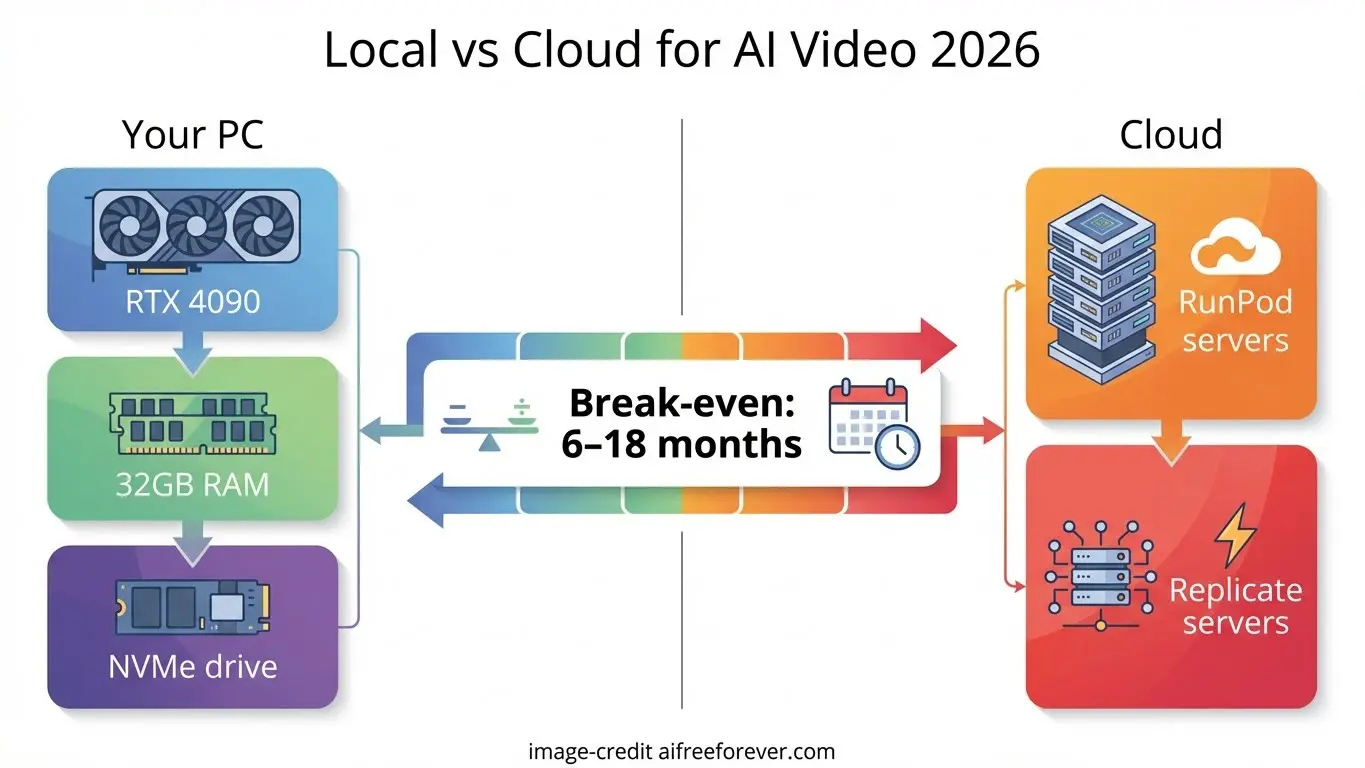
Self-hosting sounds attractive because the model itself may be open and the per-generation bill is less visible. In practice, the spend just moves from software pricing into compute and operations. If you build a local workstation, your upfront cost includes a capable GPU, enough VRAM for the model and resolution you want, CPU, RAM, fast storage, cooling, and power. If you use a cloud GPU, you avoid the upfront purchase but take on hourly rental costs, storage charges, and often egress or bandwidth fees.
The right choice depends on workload shape. A local workstation can be excellent for steady weekly use where the machine stays busy and the team knows how to maintain it. Cloud GPUs are better when demand spikes unpredictably or when you want to test multiple setups without buying hardware. Either way, “free model” does not equal “cheap video.” If you download an open source ai video generation model, you still pay for every hour of inference, every failed batch, and every minute spent keeping the environment stable.
The hidden cost categories most buyers miss
The real self-hosting bill includes more than GPU access. The full list is hardware or rented cloud GPU, storage for models and outputs, bandwidth, setup time, maintenance, monitoring, model updates, dependency management, workflow scripting, and the cost of downtime when a run fails or a driver update breaks something. Those hidden categories are exactly why self-managed AI stacks often cost more than expected.
The best published comparisons are mostly from LLM infrastructure, but the pattern is useful. In one startup-focused analysis, generating 1 million tokens with Llama 3.3 70B was estimated at $0.12 via DeepInfra’s API versus $43 on Lambda Labs self-hosting. Another comparison said an API-equivalent workload would have cost $1,870 per month, while the team paid 5.6× more to self-manage their cloud GPU setup. Different modality, same economic lesson: once you price infrastructure, administration, and idle capacity honestly, managed services often win at smaller scale.
That is why the common advice from practitioners is straightforward: you will usually be better off with a paid API up to a point. Self-hosting becomes worth serious testing when you have stable recurring workloads, in-house technical capability, and a real need for control over model choice, privacy, or data handling. If your team needs custom pipelines, wants to avoid sending assets to third-party platforms, or needs highly specific model behavior, then it can make sense to run ai video model locally or in a private cloud. But if your monthly volume is low or highly variable, the infrastructure burden can erase the savings fast.
A practical test before committing: estimate your monthly GPU utilization. If the machine will sit idle most of the time, self-hosting is probably a vanity project, not a cost optimization.
API vs self-host break-even math for ai video generation cost self host vs api
A simple monthly calculator readers can use
The fastest break-even model is this:
Total monthly API cost = generation price × total seconds generated × average attempts + add-on tools
Total monthly self-host cost = GPU or cloud cost + storage + labor + maintenance + downtime risk + add-on tools
Now make one critical improvement: calculate on generated seconds needed to get approved output, not just final exported seconds. If your target is 20 finished minutes per month and your average clip takes 3 attempts, you are effectively buying or computing 60 minutes of generation to ship 20. That retry rate is often the dominant variable in the entire equation.
For API workflows, add every extra cost that tends to get ignored: premium queues, image-to-video runs, upscaling, alternate versions, export tiers, and external editing tools. For self-hosted workflows, put an hourly value on setup and troubleshooting time even if you are doing it yourself. Free labor is not actually free when it delays delivery or eats into the rest of your production pipeline.
Example scenarios: hobby creator, agency, and production team
A hobby creator with uneven usage usually gets the cleanest result from APIs. If some months you generate a lot and other months you barely touch the tool, the flexibility matters more than raw unit price. An $8–$12/month starter plan or a modest usage-based API bill is easier to swallow than owning hardware that sits idle. If retries are high, the creator should limit costs by testing prompts on 5-second clips before committing to full sequences.
An agency sits in the middle. If the workflow includes many client revisions, style iterations, and multiple formats, retry rates can drive API costs up much faster than expected. A 30-second clip that costs $15 on paper can become $45–$75 after 3–5 attempts, and a longer campaign can snowball. In this case, the break-even question depends on predictability. If the agency is producing similar work every month, a private GPU setup becomes worth modeling. If projects are sporadic, API flexibility usually still wins.
A production team with sustained monthly volume is where self-hosting becomes genuinely interesting. If they know they will generate hundreds of minutes across repeated workflows, have technical staff, and care about model control or internal asset handling, self-hosting can move from experiment to strategy. Even then, the metric to watch is not cost per generated minute. It is cost per usable minute after retries, render failures, queue delays, and staff time.
That is the practical heart of ai video generation cost self host vs api: low-volume and uncertain usage usually favors APIs, while high-volume predictable generation is where self-hosting may finally deserve the spreadsheet treatment.
How open source video models change the self-host vs API decision
Open source ai video generation model options to evaluate
Open source changes the decision because it expands your options, but it does not automatically lower your total cost. You might compare an open source ai video generation model, an open source transformer video model, or an image to video open source model depending on whether you need text-to-video, reference-guided motion, or image animation pipelines. Those categories matter because deployment costs differ. A model that looks exciting in a demo can still be expensive if inference is slow, hardware requirements are high, or outputs need heavy cleanup.
This is also where search terms get messy. People looking at happyhorse 1.0 ai video generation model open source transformer or similar emerging projects often assume “open source” means accessible and affordable. Sometimes it does. Sometimes it means a research release with limited documentation, inconsistent support, unclear optimization paths, or requirements that push you into larger GPUs than expected. Before assuming savings, check inference speed, VRAM fit, batch behavior, prompt consistency, and whether the model is stable enough for repeated production use.
License and commercial-use checks before deployment
Licensing needs as much scrutiny as hardware. A practical open source ai model license commercial use checklist should cover four things: commercial rights, redistribution terms, model restrictions, and hosted-service limitations. Some licenses permit internal commercial use but restrict redistribution. Others allow modification but place conditions on serving the model through a public hosted product. A model can be downloadable and still be a bad fit for client work if the license blocks your intended use.
Support and documentation also have direct cost impact. If a niche model has weak install docs, sparse community examples, or no clear update path, every deployment hour gets more expensive. The smart move is to treat each candidate model as a business tool, not just a cool release. Check whether it runs efficiently on your target hardware, whether its outputs reduce retries, and whether its license supports the exact workflow you plan to monetize.
Open source is powerful when it gives you control, privacy, and model flexibility at a workload level that justifies infrastructure. It is weak when it turns your video budget into a support burden. That is why open models absolutely change ai video generation cost self host vs api, but not always in the direction people expect.
Best ways to reduce AI video generation costs whether you use API or self-hosting

Workflow changes that cut retries
The cheapest fix is usually upstream. Start with very short prompt tests before you commit to long generations. If a platform charges by seconds or burns credits aggressively, validate motion, subject consistency, camera behavior, and style on a short clip first. Using the Veo-style example, a 5-second minimum costs $2.50 at $0.50 per second. Spending a few short test runs is far cheaper than discovering a bad prompt structure after paying for repeated 30-second or multi-minute outputs.
Lock your prompt variables in stages. First validate subject and style. Then test motion. Then test shot length. Then scale duration. This reduces the classic failure pattern where every issue gets discovered at the most expensive render stage. It also lowers editing waste because you are not trying to salvage broken long-form clips that should have been rejected during short-form testing.
Budget controls and tool-stack decisions
Tool stack sprawl is another silent cost leak. Lemonlight’s estimate is the useful warning here: a low monthly subscription can still become $170–$685 per month or more once supporting tools and polishing are included. If your workflow depends on one platform for generation, another for upscaling, another for lip sync, another for editing, and another for delivery formatting, your real cost is the whole chain.
A better budgeting method is to assign limits by project stage: ideation, test renders, final renders, editing, and revisions. Put a hard cap on each stage before you start. For example, decide how much budget is available for prompt exploration, how many test generations a concept gets before it is paused, and how many final renders will be approved for polishing. That prevents retries from quietly compounding into the largest line item.
For API users, choose plans based on your actual output pattern, not brand familiarity. A slightly pricier plan with better model quality or fewer failed generations can be cheaper overall than a bargain plan with low hit rate. For self-hosters, focus on utilization and reliability. If your local or cloud setup cannot keep pace with your schedule, the downtime cost can erase any theoretical savings.
The final decision checklist is simple. Choose API when you want speed, flexibility, and low operational overhead. Choose self-host when you have sustained volume, technical capability, and a real need for control. Reassess every quarter using your own numbers: total spend, average attempts, final usable minutes, and cost per usable output. That recurring review is what keeps ai video generation cost self host vs api grounded in reality instead of marketing.
Conclusion

The cheaper path is rarely the one with the lowest headline price. API tools usually make more financial sense when usage is low, demand is uncertain, or speed matters more than infrastructure control. Self-hosting becomes worth serious consideration when your generation volume is steady, your team can manage the stack, and model control or private handling justifies the overhead.
The key is to compare actual usable output. Track how many attempts it takes to get approved clips, how much time goes into editing and troubleshooting, and what each finished minute truly costs. A $15 theoretical video that takes five tries is not a $15 video. A “free” open source model that needs expensive GPU time and constant maintenance is not free. Once you measure retry rate, monthly volume, and total workflow overhead honestly, the cheaper option gets much easier to see.