 HappyHorse Model
PixVerse V6: Features, Pricing, and Quality Review
If you want to know whether PixVerse V6 is worth using for short-form AI video work, this guide breaks down the features, pricing, output quality, and best use cases in practical terms.
PixVerse V6 video model review: what it is and who it fits best
How PixVerse V6 is positioned inside the PixVerse platform
PixVerse V6 is being presented as a newer-generation AI video model inside the broader PixVerse ecosystem, and PixVerse’s own wording frames it as “the next evolution of video synthesis.” That positioning matters because it tells you what kind of tool this is trying to be: not a niche experiment, but a practical upgrade aimed at faster, cleaner video generation for everyday production work. If your workflow lives in short clips, ad mockups, motion concepts, and social-first visuals, that framing is much more useful than vague promises about “cinematic AI.”
What makes the platform more interesting is that PixVerse is not just a text prompt box. The platform docs point to a fuller workflow stack: text-to-video, image-to-video, effects, image template, transition using first-last frame controls, and speech. That means V6 sits inside a system that can handle more than pure generation. You can ideate from text, anchor a shot from a still image, build continuity between scenes, apply template-driven structures, and add speech-related workflows without jumping across multiple disconnected apps.
That broader toolkit is important if you have compared it with an open source ai video generation model or an image to video open source model and found those options flexible but fragmented. Open ecosystems can be great when you want to run ai video model locally, tune an open source transformer video model, or evaluate an open source ai model license commercial use for internal deployment. PixVerse V6 is a different kind of value proposition: less about infrastructure ownership, more about speed and packaged usability.
Best-fit use cases for creators, marketers, and rapid prototyping
The best fit for PixVerse V6 is short-form production where iteration speed matters almost as much as final visual quality. Think social clips, ad concepts, promo visuals, product teasers, stylized motion tests, and quick internal drafts for stakeholder review. If you need to test three visual angles for the same campaign concept before lunch, this is the kind of platform setup that actually helps.
For creators, V6 looks most useful when you want to produce frequent short clips with a polished feel without building a full multi-tool pipeline. For marketers, the advantage is fast concepting across multiple messages, hooks, and visual directions. For prototyping teams, the value is even more obvious: image-to-video, transition controls, and speech support make it easier to mock complete scenes rather than isolated clips.
Where it fits less cleanly is long-form cinematic production that depends on extended character continuity, shot-by-shot narrative control, and deeper post pipelines. That does not mean PixVerse V6 cannot contribute to those projects. It means the strongest evidence points toward short-form realism-focused work rather than extended film-style generation.
This pixverse v6 video model review is best read as a practical guide to where the tool is strong right now: fast visual iteration, accessible workflows, and useful quality claims like 15-second 1080p stability and native audio. The goal is not to repeat hype that current sources do not support. The goal is to help you decide whether PixVerse V6 belongs in your real production stack.
PixVerse V6 features you can actually use in production
Text-to-video, image-to-video, and transition workflows
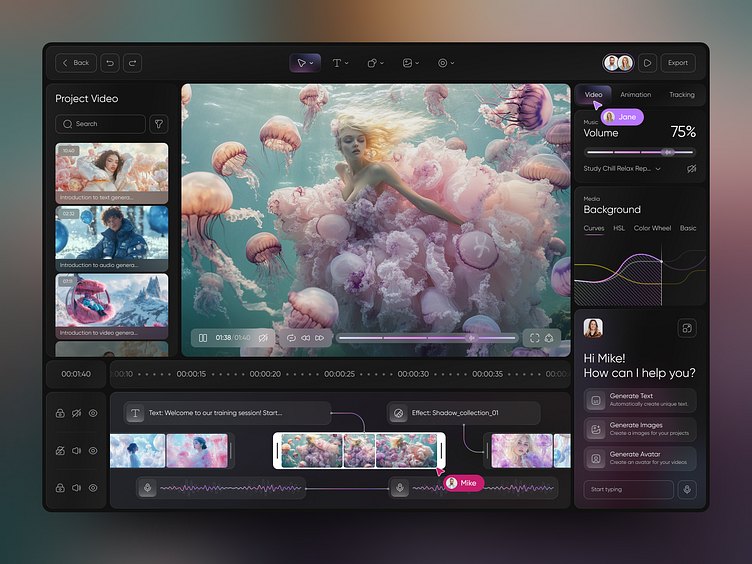
The most useful thing about PixVerse V6 is that the platform supports several workflows you can actually map to real production tasks. According to the platform docs, those include text-to-video, image-to-video, effects, image template, transition via first-last frame, and speech. That range matters because the best results in AI video almost always come from choosing the right generation path, not just writing a better prompt.
Text-to-video is the fastest way to explore ideas. Use it when you are still searching for the concept: trying camera mood, scene type, lighting direction, or visual metaphor. If you need five possible hooks for a promo, text-to-video is the right starting point because it gets you broad coverage quickly.
Image-to-video is the smarter choice when predictability matters. If you already have a product still, key art frame, character design, or ad layout, starting from an image gives the model more structure. In practice, that usually means stronger composition lock, better brand consistency, and fewer wasted generations. For client-facing work, this is often the better path because the image acts like a visual anchor.
Transition workflows using first and last frames are especially useful when you need scene continuity. If you want one shot to evolve into another, or you need a before/after visual without a jarring cut, this feature is more practical than trying to brute-force continuity through a long prompt. It also opens up easy use cases for product reveal sequences, transformation clips, and social transitions.
Effects and image templates can help when speed matters more than pure originality. Templates are useful for repeatable formats, while effects can shorten the time from concept to usable output for campaigns that need volume.
1080p output, 15-second stability, and native audio
The strongest production-oriented claim in the available PixVerse V6 research is “15-second 1080p stability and native audio.” For short-form work, that is not a minor detail. A lot of AI video tools look okay in quick demos but start to break when you push duration, motion, or output resolution. If V6 can hold together across 15 seconds at 1080p, that directly affects whether clips feel usable for ads, promos, and social edits.
1080p matters because it gives you enough resolution for delivery across common channels without your output immediately looking like a preview render. Fifteen-second stability matters because it aligns with actual short-form content lengths: paid social hooks, product ads, story segments, reels inserts, and looping promo spots. Native audio matters because even basic synchronized sound can cut a lot of friction from social production and proof-of-concept editing.
Reviews also point to practical strengths such as cinematic realism, stronger control over color grading, improved texture rendering, and output that looks less obviously AI-generated. Those claims are worth paying attention to because texture and color are often where synthetic footage falls apart. Better texture handling can help with fabrics, skin, surfaces, hair, and product materials. Better color grading control helps when you need a more deliberate mood instead of the flat, generic look that weaker models often produce.
A simple rule for production: use text-to-video when ideation is the priority, use image-to-video when consistency is the priority, and use transition workflows when continuity is the priority. That one choice alone can save a surprising amount of credits and revision time.
PixVerse V6 pricing review: plans, credits, and API cost estimates
Consumer plans: free vs standard
The consumer pricing is straightforward enough to evaluate quickly. The Free plan is $0 per month, and the Standard plan is $10 per month. The Standard tier includes 1,200 monthly credits, HD resolution, and 3 concurrent generations, based on the cited pricing source from Imagine.Art. If you are testing whether PixVerse V6 belongs in your workflow, that low entry point is one of its strongest advantages.
The difference between free and standard is not just “more usage.” HD output and 3 concurrent generations change how you work. HD matters because low-res previews can hide visual defects that become obvious once you move toward delivery. Concurrent generations matter because they let you compare prompt variations in parallel instead of waiting through a one-by-one queue. If you are refining a product ad, you can test three camera moves at once, or three emotional tones, or three scene setups from the same base prompt.
That kind of concurrency is especially useful for short-form workflows where the main bottleneck is not editing, but choosing the strongest concept fast enough. With 3 concurrent generations, a single session can cover more ground: one realistic take, one stylized variation, and one safer brand-aligned version, all before you commit credits to refinements.
For many creators and lean teams, the Standard plan looks like the practical default. It is cheap enough for experimentation but structured enough for regular use. If you are comparing closed tools with an open source ai video generation model setup, the economics are different. Open systems may look cheaper if you already have hardware and engineering time, especially if you want to run ai video model locally. But for most short-form commercial work, paying $10 for fast access, HD output, and concurrency is often the easier decision.
API and usage-based pricing by resolution
The platform docs note that model usage maps to corresponding credit consumption based on the model and parameters selected. That means there is no single universal “cost per generation” rule across every workflow. Duration, resolution, and possibly other settings all affect spend, so estimating project cost requires thinking in outputs rather than monthly plan labels.
Third-party provider references help put real numbers on that. Segmind lists PixVerse V6 pricing for 360p at:
- 360p, 1: $0.04375
- 360p, 2: $0.0875
- 360p, 3: $0.13125
- 360p, 4: $0.175
WaveSpeedAI provides image-to-video pricing ranges by resolution:
- 360p: $0.025/s and $0.035/s
- 540p: $0.035/s and $0.045/s
- 720p: $0.045/s and $0.060/s
- 1080p: $0.090/s and $0.115/s
Those rates are useful for rough planning. For example, a 10-second 1080p image-to-video clip at WaveSpeedAI rates would land around $0.90 to $1.15. A 15-second 1080p clip would be roughly $1.35 to $1.725. If you are producing five final 15-second ad variants, your render cost estimate could be around $6.75 to $8.625 before accounting for failed tests and extra revisions. That is a much more realistic budgeting method than thinking only in monthly subscription terms.
For concepting, lower-resolution passes make more financial sense. Build scene language and motion ideas at 360p, 540p, or 720p, then move only the strongest candidates to 1080p. That approach is especially effective if you are generating in volume for pitches, storyboards, or internal review decks.
If your workflow already revolves around a happyhorse 1.0 ai video generation model open source transformer or another open source transformer video model, API costs like these are the main tradeoff against self-hosting. You give up some infrastructure control, but you gain speed, convenience, and a cleaner path to production-ready output.
PixVerse V6 video quality review: realism, motion, and consistency
Where PixVerse V6 looks strong
The current quality case for V6 rests on a few specific claims that are actually useful. Reviews describe cinematic realism, stronger control over color grading, better texture rendering, and output that looks less like obvious AI software. Those are exactly the areas that tend to separate a usable short-form model from one that only works in heavily curated demos.
Realism is not just about photoreal faces. It also shows up in lighting transitions, material response, camera movement feel, and whether motion reads as intentional instead of synthetic. Better color grading control is valuable when you want a warm commercial look, a moody launch teaser, or a sharper contrast-heavy social ad without fighting the model on every attempt. Improved textures matter because fake-looking surfaces break the illusion fast, especially in closeups or product-focused work.
The other major claim is 15-second 1080p stability with native audio. That stability can have a huge impact on perceived quality because short clips often fail in the middle rather than the beginning. A generation that starts strong and then loses facial coherence, object shape, or scene geometry by second eight is not really usable. If V6 is stronger across the full 15-second window, that makes movement, transitions, and continuity feel much more professional.
What to test before using it for client or commercial work
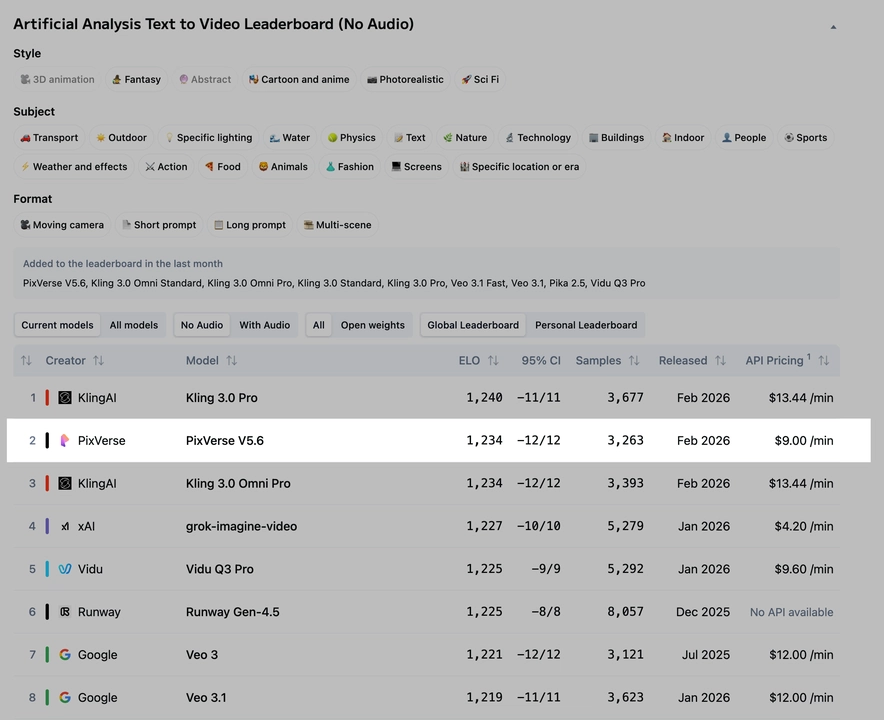
Even with encouraging claims, this is where disciplined testing matters. The current research does not give strong, source-backed head-to-head benchmarks for PixVerse V6 versus major rivals. So the right move is to validate with your own prompt pack before treating it as a client-safe default.
A useful evaluation checklist:
- Structural stability: do bodies, products, and environments keep their shape through the full clip?
- Facial consistency: does the face remain recognizable across movement, angle changes, and expression shifts?
- Motion smoothness: do camera moves and subject actions flow naturally, or do they jitter and warp?
- Texture coherence: do hair, fabric, skin, reflections, and surfaces stay believable frame to frame?
- Audio usefulness: if you use native audio, is it actually usable for a rough cut or social delivery draft?
Run the same test set across several scenarios: a talking character, a walking motion shot, a product beauty clip, a transition sequence, and an image-to-video ad concept. That gives you a better read than any isolated “hero generation.”
For commercial work, check editability too. Export a few clips into your normal timeline and see how they behave once trimmed, slowed, reframed, or layered with text and branding. A model can look great in-platform and still become awkward when it hits a real ad workflow.
This pixverse v6 video model review lands in a positive but cautious place on quality: strong signs for short-form realism and polished outputs, but not enough independent benchmark depth yet to skip your own validation process.
PixVerse V6 vs Pika and Runway: how this pixverse v6 video model review compares the options
Where PixVerse appears stronger
Based on the available comparison notes, PixVerse appears to have a practical edge when your target is fast short-form output with stronger realism and less generation delay. One cited comparison says Pika has an edge in anime and 2.5D styles, but can take longer to generate content and may have slightly lower image quality in that comparison. If you are building realistic promos, product clips, or social ads instead of stylized animation experiments, that pushes PixVerse into a favorable position.
The same comparison source describes Runway as weaker in model quality relative to the comparison set. That should be treated carefully because it is still a relative claim from a single source, not a broad benchmark consensus. Even so, it points in the same direction as the general V6 positioning: PixVerse is trying to win on visually appealing short-form generation rather than ecosystem breadth alone.
There is also an older directional data point from a PixVerse V5.6 versus Runway Gen-4 side-by-side test. In that 8-second 1080p high-frequency stability test, PixVerse V5.6 reportedly showed slightly more stable structural lock than Runway Gen-4. That is not proof about V6, but it does suggest PixVerse had already been competitive on structure stability before this newer release.
When another tool may be the better pick
The biggest caution is simple: there is no strong source-backed V6-specific benchmark showing exact performance against Pika and Runway across standardized prompts. So recommendations should stay tied to use case, not absolute claims.
Choose PixVerse V6 when you want fast, realism-focused clips for social, ads, or rapid visual iteration. That is where the 15-second 1080p stability claim, native audio, image-to-video support, and parallel generation setup make the most practical sense.
Choose Pika when your project leans stylized, especially anime-adjacent or 2.5D work. If that style language is the goal, a tool with a cited edge there is worth the extra generation time.
Choose Runway when broader ecosystem fit matters more than this specific model comparison. If your team is already deep in Runway tools, collaborative workflows, or adjacent creative features, that wider integration may outweigh any narrow quality advantage suggested in current snippets.
If you are also weighing these against an open source ai video generation model stack, the decision shifts again. Open tools can offer deeper control, local deployment, and easier experimentation with things like an image to video open source model or happyhorse 1.0 ai video generation model open source transformer pipelines. But for straightforward speed-to-output, PixVerse currently looks easier to put to work without building around the tool.
How to get the best results from PixVerse V6 for short-form video work
Workflow tips for faster iteration
The easiest win on the Standard plan is using the 3 concurrent generations intentionally instead of randomly. Do not send three nearly identical prompts. Send three strategically different versions of the same idea. One can vary camera motion, one can vary scene detail, and one can vary mood or lighting. That way each batch teaches you something useful.
A simple pattern that works well:
- Version A: safer prompt with clean subject description and restrained motion
- Version B: same scene with stronger cinematic camera language
- Version C: same idea, but anchored to a different visual tone or pacing
That gives you a fast comparison set, and one of those usually becomes the base for your next round. If you are using image-to-video, keep the source image constant while changing motion intent. If you are using text-to-video, keep the concept constant while changing framing and style.
Use image-to-video whenever you care about consistency, branding, or product accuracy. Use text-to-video for first-pass ideation and concept discovery. Use transition or first-last frame workflows when the job is continuity: product transformations, scene reveals, before/after clips, and visually linked social sequences. Use speech and native audio when sound is part of the pitch, the proof-of-concept, or the final short-form post.
Choosing resolution and budget for each project
Resolution choice should track the stage of the project, not your excitement level. For concepting, go cheap and fast. Lower-cost tiers such as 360p or 540p are enough to test composition, camera intent, pacing, and whether a prompt has the right visual DNA. Save HD and 1080p for finalists, delivery assets, or anything being shown to a client as a serious candidate.
A practical budget framework:
- Social concept testing: start low-res, batch lots of variants, upscale only winners
- Paid ad drafts: concept at low or mid-res, finish strongest 2 to 3 options in HD or 1080p
- Prototype storytelling: use text-to-video for breadth, then image-to-video for lock-in
- Client review drafts: prioritize image-to-video and 720p or 1080p for more stable presentation
If you are cost-sensitive, estimate backwards from your final deliverables. For example, if you need three 15-second 1080p clips, use lower-resolution generations to narrow from fifteen ideas to three before you spend on high-res output. Based on WaveSpeedAI’s cited 1080p image-to-video pricing, that can keep render costs under control quickly.
The best results usually come from balancing three levers:
- Quality: image-to-video, stronger source control, higher resolution
- Speed: text-to-video ideation, parallel generations, lower-res testing
- Cost: fewer high-res renders, more structured prompt iteration, only upscale proven winners
This is where a practical pixverse v6 video model review becomes useful: the tool looks strongest when you treat it like a short-form production engine, not a magical one-click film studio. Build your workflow around iteration first, then lock your best outputs for polish.
Conclusion
PixVerse V6 looks like a strong fit for short-form AI video work when the priority is getting polished-looking clips quickly without building a complicated multi-tool stack. The most important source-backed reasons are clear: it sits inside a broader workflow platform, supports more than basic text-to-video, offers a low-cost Standard plan at $10 per month with 1,200 credits and 3 concurrent generations, and carries the standout claim of 15-second 1080p stability with native audio.
That combination makes it especially appealing for social clips, ad concepts, promos, and rapid visual prototyping. Image-to-video and transition workflows give it practical control where pure prompt-based systems often struggle, and the current quality claims around realism, color grading, and textures are promising enough to justify serious testing.
The main limitation is benchmark certainty. Direct, source-backed V6 comparisons against Pika and Runway are still thin, so the smartest move is to run your own prompt pack before standardizing on it for commercial delivery. If your work is realism-focused and short-form, PixVerse V6 is probably the better first pick. If you want anime or 2.5D experimentation, Pika may suit that style better. If broader ecosystem integration matters most, Runway may still make more sense.
For most fast-turn content pipelines, PixVerse V6 offers a very workable mix of quality, speed, and pricing. If your job is making short videos that need to look good fast, it is one of the more practical tools to test right now.