 HappyHorse Model
SkyReels V4: API Access, Pricing, and Output Quality Guide
If you want to test the skyreels v4 video model api for real projects, the fastest path is understanding how to get access, what credits actually buy, and which V4 features matter most for output quality. SkyReels is already positioning V4 as a live model on its API Platform for teams that want to build and scale creative products with state-of-the-art video and image generation, so the practical questions come first: how do you get a key, what does a monthly plan really cost per usable output, and how should you evaluate quality before you wire it into production workflows?
What makes V4 especially interesting is that SkyReels is not presenting it as a basic text-to-video endpoint. The platform pushes a multimodal workflow where text, images, video, and audio can be combined to generate audio-synchronized videos, plus a set of direct controls that are actually useful in production: Consistency Control, Motion Reference, Video Editing, and Auto Multi-Shot video. If you are comparing options against tools people already mention in the same breath—Kling, Luma Dream Machine, Hailuo or Minimax, and Runway—the smartest move is not chasing hype. It is testing V4 against your own workflow, your own edit cycle, and your own credit burn.
What the SkyReels V4 video model API offers
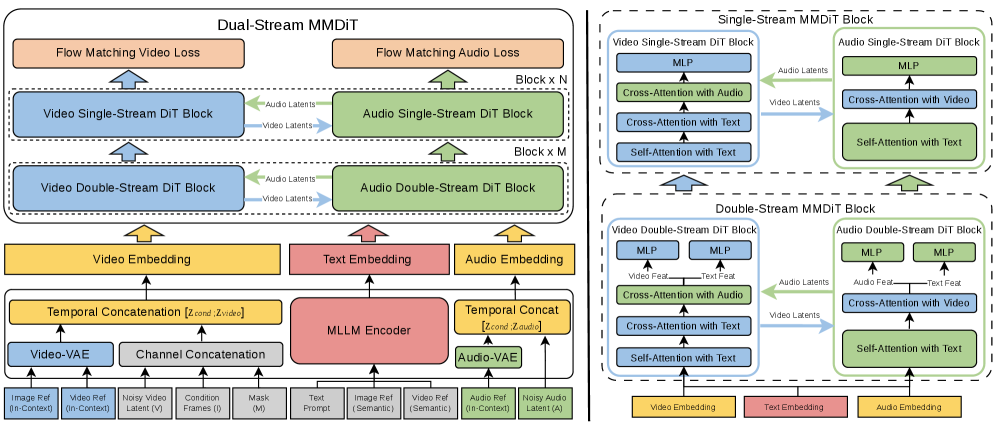
Core V4 capabilities at a glance
SkyReels says its API Platform is built to help users “build and scale creative products” with SOTA video and image generation models, and it explicitly notes that “SkyReels V4 is live” with new features and multimodal input. That wording matters because it frames V4 as an active production model rather than a waitlist concept. If you are building an internal ad tool, a creator workflow, or an automated content pipeline, that live status is the first signal that you can start prototyping now instead of planning around future access.
The bigger differentiator is the multimodal design. SkyReels says V4 can create audio-synchronized videos from combined text, images, video, and audio inputs. In practice, that means you are not forced into a one-prompt-one-output pattern. You can start from a text concept, anchor it with an image, steer movement using a source video, and align the final output to audio timing. For branded content, music-backed promos, product explainers, and stylized social clips, that flexibility is a lot closer to real creative work than a prompt-only generator.
SkyReels also highlights four concrete V4 features you can use directly: Consistency Control, Motion Reference, Video Editing, and Auto Multi-Shot video. Those names are not filler. They map to the exact areas where many video generations break down: characters drifting from shot to shot, motion feeling random, edits requiring a full rerender, and multi-scene outputs lacking structure. If you have used an open source ai video generation model, an image to video open source model, or even tested an open source transformer video model pipeline, you already know that control and continuity are the pain points that decide whether a clip is usable.
Supported inputs and output specs
SkyReels describes V4 as able to combine text, images, video, and audio into a single generation workflow, and that opens up a few practical production patterns. You can use text for scene direction, images for visual grounding, source video for movement or layout reference, and audio for synchronization. That is a strong fit for short-form ads, cinematic explainers, creator intros, lyric visuals, and social content where timing matters as much as composition.
On output quality, SkyReels has published a headline spec of 1080p at 32 FPS. It also describes V4 as capable of generating “polished multi-scene videos instantly” with dynamic angles, smooth transitions, and cinematic-ready content. Those are promotional claims, of course, but they give you concrete targets to validate. When you test, you are not just checking if a clip looks good in isolation. You are checking whether V4 can actually hold up at full HD, preserve motion smoothness at 32 FPS, and maintain quality across multiple scenes instead of one strong opening shot followed by drift.
Another detail worth noting is SkyReels’ claim that V4 is the “first open-source AI that generates video and audio together.” Whether you are coming from the happyhorse 1.0 ai video generation model open source transformer side of the market, or from teams trying to run ai video model locally, that open-source framing naturally raises questions about portability and licensing. For API users, the immediate practical issue is simpler: use the hosted platform first, because the API gives you the shortest path to evaluating the unified audio-video workflow without the overhead of local deployment.
How to get SkyReels V4 video model API access step by step
Create your API key
The onboarding path is straightforward, and SkyReels has documented the key step clearly. First, log in to your SkyReels account. Once you are signed in, open Account, then go to API Keys, and click Create new secret key. That is the exact sequence from the quickstart flow, and it is the fastest route to first access. If you are setting this up for a team, create the key only after you know which environment will use it, because it is much easier to track test usage when each app or staging workflow has a clear purpose.
Once the secret key is created, store it immediately in your password manager or secrets vault. Do not leave it copied in a local notes file or pass it around in chat. If you are doing a quick proof of concept, put the key into a simple server-side script first rather than dropping it into a client-facing demo. That keeps the initial test clean and prevents avoidable account risk before you even know your expected credit burn.
A smart first test is a tiny one: run a single text-led generation, then a multimodal test using an image or short source asset, then review the output quality against your actual use case. That sequence tells you more than one flashy prompt ever will. It also gives you early visibility into how the skyreels v4 video model api behaves with the kinds of controls that make V4 interesting in the first place.
Where to find console, docs, and support
SkyReels appears to support a self-serve onboarding path directly on the API Platform. The main resources called out are Console, Get API Key, Documentation, and Pricing. That combination is exactly what you want when you are moving from curiosity to implementation. Start in Get API Key to create credentials, open Documentation next to understand request structure and supported capabilities, then use Console if you want to inspect the platform environment or test workflow pieces before deeper integration.
The pricing page matters earlier than most people think. Before building anything elaborate, check the current plan structure and credit conversion so you know what your test cycle costs. SkyReels states that 1 USD equals 100 credits, and the monthly plans create different effective per-credit costs. If your team skips this step, it becomes very easy to prototype something that looks efficient in code but is too expensive in practice.
For integration issues, account questions, or cases where documentation does not fully answer what you need, SkyReels provides a direct support contact at feedback@skyreels.ai. Use that route when you hit questions around API access, setup friction, account behavior, or uncertainty about feature availability. It is especially worth emailing before production rollout if you are handling client work, need confirmation on plan details, or want to sanity-check intended usage.
The cleanest first-run flow is simple: create the key, review the docs, check pricing, then run a small credit-limited trial before any production deployment. That order keeps your evaluation grounded. You will know what the endpoints require, what the plan includes, and what a real output costs before your team commits engineering time.
SkyReels V4 video model API pricing and credit math

Credit conversion and monthly plans
SkyReels states its base pricing unit clearly: 1 USD = 100 credits. That gives you a clean conversion rule for testing and planning. If a workflow consumes 500 credits, you can mentally translate that to roughly $5 at base value. The monthly plans become more attractive because they improve the effective per-credit price compared with a simple one-dollar-to-one-hundred-credit framing.
The listed monthly options break down like this:
- Basic-Monthly: $31.5/month for 2100 credits/month, which works out to $0.015 per credit
- Pro-Monthly: $60/month for 4500 credits/month, which works out to $0.013 per credit
- Max-Monthly: $93.5/month for 8500 credits/month, which works out to $0.011 per credit
Those lower effective credit rates are the real reason plan selection matters. Moving from Basic to Pro drops the unit cost, and Max improves it further. If your workflow is repeatable and you already know you will use the credits, the higher tiers buy better value per generation. If you are still validating quality and prompt structure, Basic is usually the safer way to learn.
SkyReels also lists the same included feature bundle across these paid plans: high quality AI image generator, powerful AI video generation, AI video effect features, commercial license, fast generation queue, and private generations. That is more important than it looks. Commercial license coverage matters if you are delivering client work or internal campaigns, and private generations are a practical plus if you are handling unreleased creative assets or confidential brand visuals.
How to estimate cost before you build
The easiest way to estimate budget is to work backward from usable outputs rather than total generations. Start by defining what counts as usable in your workflow. For example, if you normally need three attempts to get one approved clip, your real cost per delivered video is triple the cost of a single generation. This is where a small proof of concept saves money. Use your first credits to learn average attempts per keeper.
For testing, the Basic plan at 2100 credits is a sensible sandbox. It is enough to run several small experiments across text-to-video, image-guided generation, motion-led prompts, and one or two multi-scene attempts without overcommitting spend. If your production rhythm is weekly publishing—say a steady flow of social promos, ad variations, or creator clips—the Pro tier at 4500 credits often fits better because the lower per-credit rate gives you more room for revisions. For higher-volume output, agency work, or multiple content streams, Max at 8500 credits gives the best listed unit value.
You may also run into external pricing summaries that mention different entry points, including a third-party reference to a Standard plan starting around $28 per month. Treat those as secondary commentary, not source of truth. First-party listings currently matter more than roundup content, especially when monthly plan names, credit bundles, or benefits may change over time.
There is also a stray pricing snippet mentioning 7200 credits per year at $0.015/credit, but unless you can verify that exact offering on the official current pricing page, it should not drive your buying decision. The official page is where you confirm plan details before scaling.
If you care about topics like open source ai model license commercial use, this is another reason to check first-party terms and plan inclusions directly. SkyReels explicitly includes a commercial license in listed paid plans, and that is a practical advantage when you need clarity for client or brand usage.
How to use SkyReels V4 features to improve output quality
Best uses for Consistency Control and Motion Reference
Consistency Control is the feature to reach for when your output needs to feel like one piece instead of a string of unrelated clips. Character identity, wardrobe, styling, background mood, and scene continuity often drift across generations, especially once you move beyond a single shot. SkyReels explicitly lists Consistency Control as a V4 capability, and the practical use is simple: apply it whenever the same subject or visual language needs to survive multiple cuts. That includes ad campaigns with the same product hero, creator avatars, recurring branded environments, and multi-shot mini stories.
A good test pattern is to generate three connected shots of the same subject: a wide intro, a medium action shot, and a close-up payoff. If the face, costume, lighting logic, and color treatment stay coherent, Consistency Control is doing its job. If not, you know exactly where your prompt, references, or workflow need adjustment before you scale.
Motion Reference is equally valuable when random motion is not good enough. If you want a certain kind of camera move, pacing, or action energy, this feature gives you a way to guide movement more deliberately. Use it when the shot needs a specific feel: slow cinematic push-in, energetic handheld momentum, clean product orbit, or a controlled lateral tracking move. Instead of hoping the model interprets “dramatic camera movement” correctly, you anchor it with a more directed motion style.
That matters for people comparing hosted workflows with efforts to run ai video model locally. Local experimentation can be powerful, especially with an open source transformer video model or an image to video open source model stack, but motion steering often becomes a lot of manual trial and error. Motion Reference is useful precisely because it shortens that loop.
When to use Video Editing and Auto Multi-Shot
Video Editing is the right choice when you already have an asset that is close to usable and you need refinement rather than total regeneration. If the composition works but the timing, details, or continuity need improvement, editing the existing clip is usually more efficient than starting from scratch. This is especially true when your source already matches brand layout, actor framing, or scene structure. Instead of paying for repeated fresh generations, you improve what is already working.
That workflow is ideal for ad creatives, product videos, and social content where iteration speed matters. Maybe your first output nails the opening frame but loses coherence in the second half. Maybe the scene is strong but the motion is too flat. Video Editing gives you a way to preserve the valuable parts while revising the weak ones.
Auto Multi-Shot is the feature to test when your goal is a polished, cinematic-ready sequence rather than one isolated clip. SkyReels promotes V4 as able to create polished multi-scene videos with smooth transitions and dynamic angles, and Auto Multi-Shot appears designed to accelerate exactly that kind of output. Use it for mini trailers, narrative snippets, UGC-style ads with multiple beats, or visual explainers that need a beginning, middle, and end.
The practical advantage is structure. Instead of manually stitching separate generations and hoping they match, Auto Multi-Shot can help produce a more coherent sequence from the start. That usually means smoother transitions, stronger pacing, and less cleanup in post. For many teams, that is where the skyreels v4 video model api moves from “interesting generator” to “usable production tool.”
SkyReels V4 video model API output quality: what to test before production
A practical quality checklist
Before you push V4 into production, use a repeatable checklist and score every output against it. Start with audio-video sync. SkyReels emphasizes audio-synchronized video generation, so verify whether beats, speech timing, or sound-driven actions actually align. Even a visually strong output can fail in ads, explainers, or music-led content if the sync slips.
Next, check motion smoothness. Since SkyReels publishes a 1080p / 32 FPS output claim, you want to confirm whether camera movement and subject motion feel stable at the delivered frame rate. Look for jitter, unnatural acceleration, warped limbs, and micro-stutters in transitions. Then review scene transitions, especially on multi-shot outputs. SkyReels claims polished multi-scene videos with smooth transitions and dynamic angles, so your test should include at least one output that changes scenes more than once.
After that, score consistency across shots. Does the subject stay recognizable? Do colors, styling, and scene logic remain coherent from cut to cut? This is where Consistency Control should prove itself. Finally, confirm your final resolution and frame rate needs. A 1080p / 32 FPS headline sounds strong, but what matters is the actual delivered file quality in your publishing stack. Export a test, upload it to your intended platform, and see how it survives compression.
A good production scorecard can be as simple as five columns: sync, motion, transitions, consistency, and deliverable quality. Rate each from 1 to 5 and track the average credits spent per successful clip.
How SkyReels V4 compares by workflow
When people compare V4, they often mention names like Kling, Luma Dream Machine, Hailuo or Minimax, and Runway. Those are fair comparison points because they are already in the same creative conversation around text-to-video and image-to-video workflows. What you should not do is assume a generic ranking without testing your own content type. The research available here does not provide benchmark results, so the right move is a workflow-based comparison.
For text-to-video, compare how well V4 translates prompt structure into coherent action and camera language. For image-to-video, test how faithfully it preserves source identity, style, and composition while adding believable motion. For ad creatives, measure speed to a usable branded clip, not just visual spectacle. For multi-scene storytelling, evaluate whether Auto Multi-Shot and consistency tools reduce your edit burden compared with alternatives.
This matters because different tools win in different places. A model that looks impressive in isolated demos may still be weaker for audio-synced sequences or brand continuity. SkyReels’ official claims around multimodal input, unified audio-video generation, cinematic angles, and polished multi-scene output give you a strong testing framework. Use those claims as your checklist, then compare based on your actual production path instead of a generic “best AI video model” debate.
Best practices for choosing a SkyReels V4 video model API plan
Which plan fits your workflow
Plan selection gets easier when you tie it to actual production behavior instead of abstract budget tiers. Basic is the right place for low-risk testing. At $31.5 for 2100 credits, it gives you enough room to validate prompts, compare feature behavior, and calculate how many attempts it takes to get one usable asset. If you are still deciding whether the skyreels v4 video model api fits your stack, Basic keeps the experiment controlled.
Pro fits recurring production. At $60 for 4500 credits and a lower per-credit cost of $0.013, it is better for weekly publishing, steady social content, internal creative requests, or a regular stream of ad variations. You are not just buying more credits. You are buying lower unit cost while keeping your process flexible enough for revisions and iteration.
Max is the practical choice for larger output volume. At $93.5 for 8500 credits and about $0.011 per credit, it gives the strongest listed value if you already know your team can use the volume. Agencies, multi-brand teams, or creators running several active channels are the obvious fit. The key is predictability: only move up when your workflow consistently consumes credits efficiently.
All listed paid plans include commercial license and private generations, which is a big deal in real client and internal campaign work. Those inclusions reduce friction around usage rights and confidentiality, and they are worth factoring into the plan decision, not treating as minor extras.
A simple rollout plan for teams and solo creators
The cleanest rollout plan starts with a proof of concept. Pick one representative use case—maybe a 15-second ad, a product reveal, or a three-shot social clip—and run enough generations to measure credits per usable video. That number is more valuable than any headline plan comparison because it reflects your actual prompts, your quality standards, and your revision habits.
For solo creators, a good sequence is Basic first, then upgrade only after you can predict average output cost with reasonable confidence. For teams, create a small internal test lane where one or two people generate assets using the same prompt templates and evaluation checklist. Track which V4 features improve keeper rate: Consistency Control for continuity, Motion Reference for better directed movement, Video Editing for efficient revision, or Auto Multi-Shot for more structured outputs.
Once you know your keeper rate, match the plan to volume. If Basic covers your monthly experiments with room left over, stay there. If you are bumping into limits while publishing regularly, Pro usually becomes the practical middle ground. If several stakeholders are generating content and the workflow is already validated, Max often makes more economic sense because of the lower listed per-credit rate.
One final caution: external pricing summaries can differ from first-party listings. You may see third-party pages referencing a Standard plan or alternative pricing examples, but before scaling spend, confirm the current details on the official pricing page. Monthly bundles, names, and included features can shift, and a five-minute verification step is better than building a budget on outdated numbers.
Conclusion

SkyReels V4 becomes much easier to evaluate once you break it into three things: access speed, credit efficiency, and output quality under your own workflow. Access is simple enough—log in, go to Account, open API Keys, and create a new secret key—then use the platform’s Console, Documentation, and Pricing pages to move from setup into testing without much friction. If you hit edge cases or account questions, feedback@skyreels.ai is the practical contact point.
On pricing, the big numbers to remember are straightforward: 1 USD equals 100 credits, Basic gives 2100 credits for $31.5, Pro gives 4500 for $60, and Max gives 8500 for $93.5. Those plans also include commercial license, private generations, fast generation queue, and the core image and video features, which makes them easier to justify for real work than bare-bones experimentation.
For quality, start small and test what actually matters: audio-video sync, motion smoothness, scene transitions, continuity across shots, and whether the delivered 1080p / 32 FPS output holds up after export and compression. Then use the V4 controls intentionally—Consistency Control for shot-to-shot stability, Motion Reference for directed movement, Video Editing for efficient refinement, and Auto Multi-Shot for faster cinematic structure. If you choose your entry point based on those tests instead of hype, you will know very quickly whether SkyReels V4 is the right production fit for your pipeline.